Content calendar
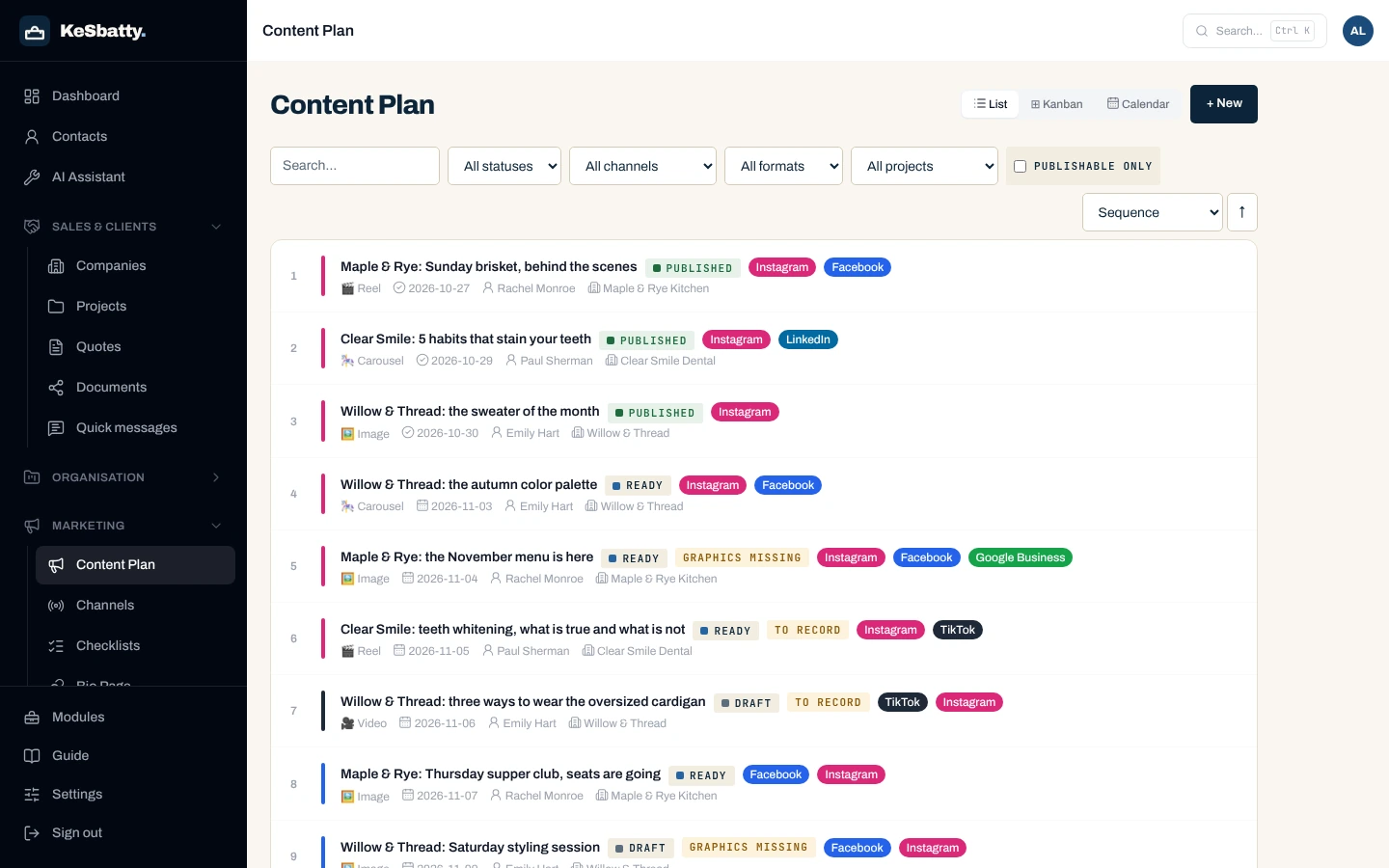
Posts per client and per channel, as a list, kanban or calendar, with a production status and two dates.
For people who run other people's social media
Each client's content calendar, the quotes they sign from their phone and the files they owe you: all in the same place, and your clients never have to open an account.
Full toolbox - launch price: €7.99 per month.
First you can try every module for 14 days, no card needed.
Works in the browser, on your phone too. Data hosted in Europe. Export your contacts to CSV whenever you like.
The job isn't hard, it's scattered. Every client ends up partly in a spreadsheet, partly in a chat, partly in a folder, and you are the one holding the connections in your head.
Post dates live in one file, channels in another column, and the latest version is whichever one you remember.
One board to see what's ready, another for the rest of the work, and none of them knows who the client is.
The copy arrives in an email, the rest is "I'll send it tomorrow". Then the hunt begins, and the launch slips a week.
You write it, export it, send it, and you don't know if they opened it. The reminder is one you write by hand, if you remember.
Four things you do every week, shown with real screenshots from the app. Names and data in the images are samples.
Every post has a client, a format, a date and one or more channels: write the copy once and send it out on Instagram and Facebook without duplicating it. See it as a list, a kanban board or a month calendar.
"Ready" doesn't mean "publishable". If the reel hasn't been shot yet or the graphic is missing, the post says so, and the "Publishable only" filter shows what you can put online right now. The planned date and the day it actually went out are two separate fields.
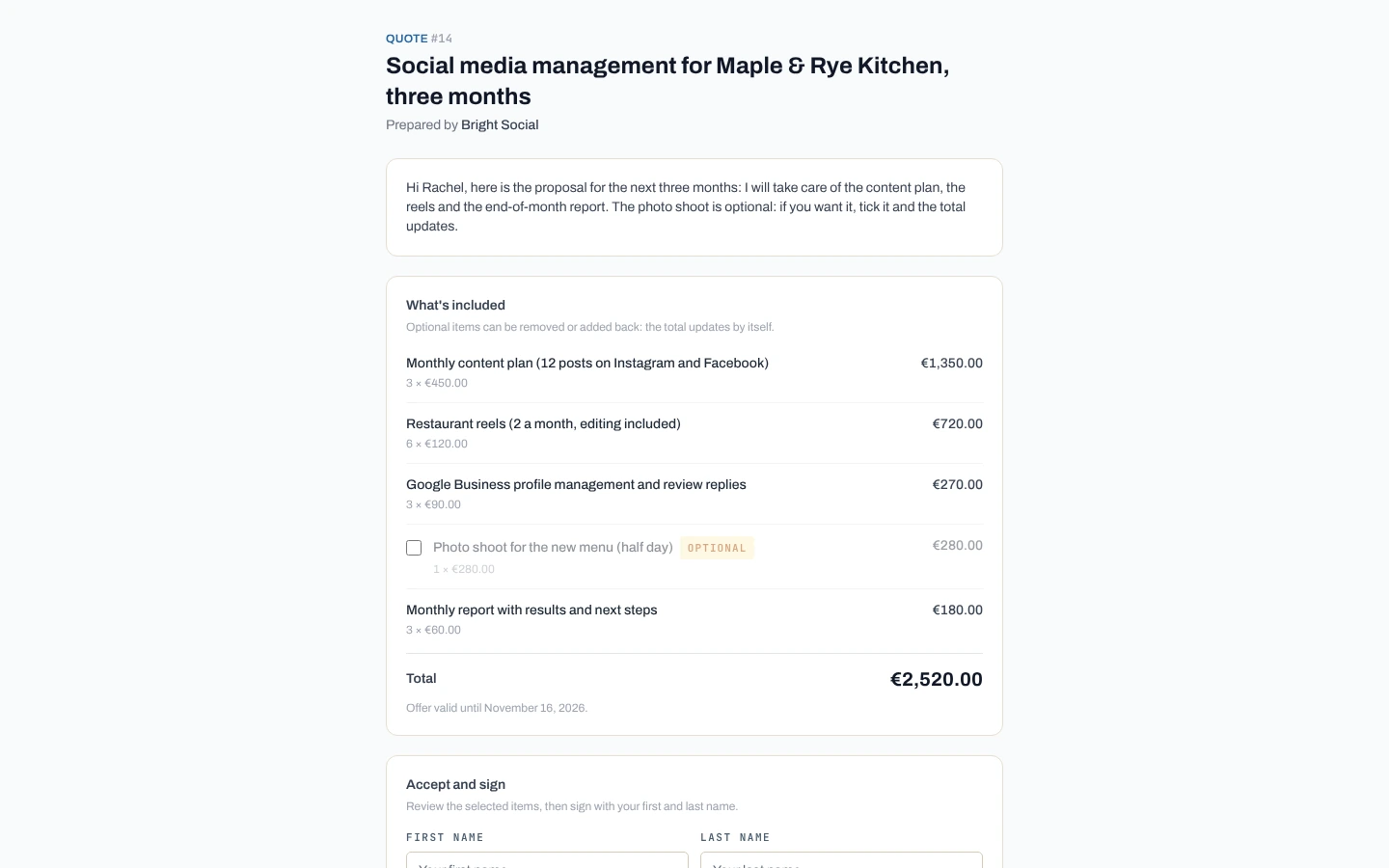
Service lines from your own price list and optional items the client ticks or unticks, with the total updating by itself. You send a link: they open a web page, check the lines and sign with first name, last name and consent. They don't need an account.
Once it's signed the quote locks, you get an email and the contact moves to Purchased. Until they sign, an automatic reminder goes out (by default every three days, at most twice, and you can change it) and in the list you see whether they opened it or not.
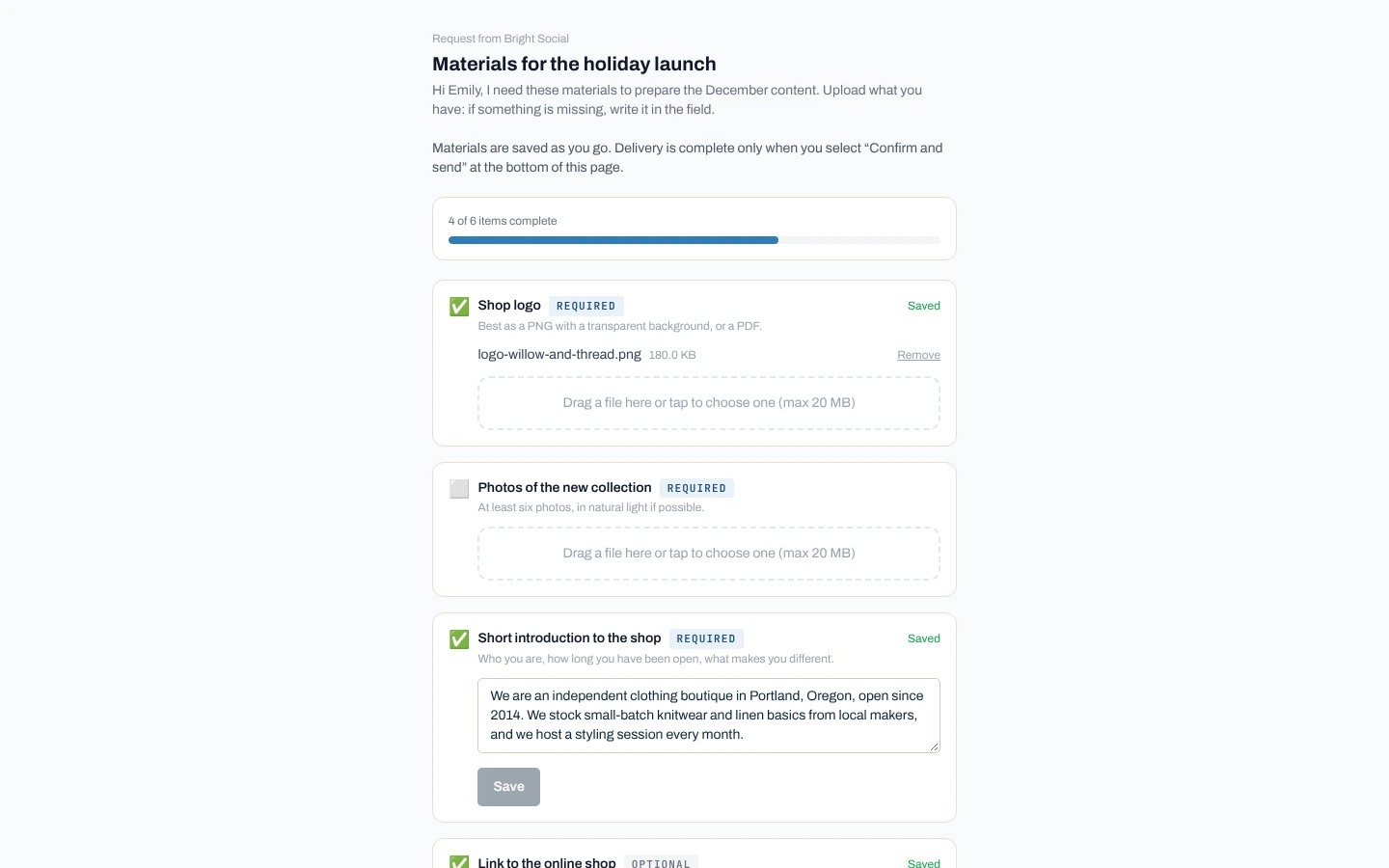
Make a request listing what you need: files, text or links, required or optional. The client opens the link on their phone, gets a one-time code by email and hands everything over. No account, no password. Files can be up to 20 MB each.
You see "4 of 6 items complete" without writing to anyone. If something is missing, a reminder goes out on its own, or you send one yourself on WhatsApp with the message already written. Lists you always ask for can be saved as a template.
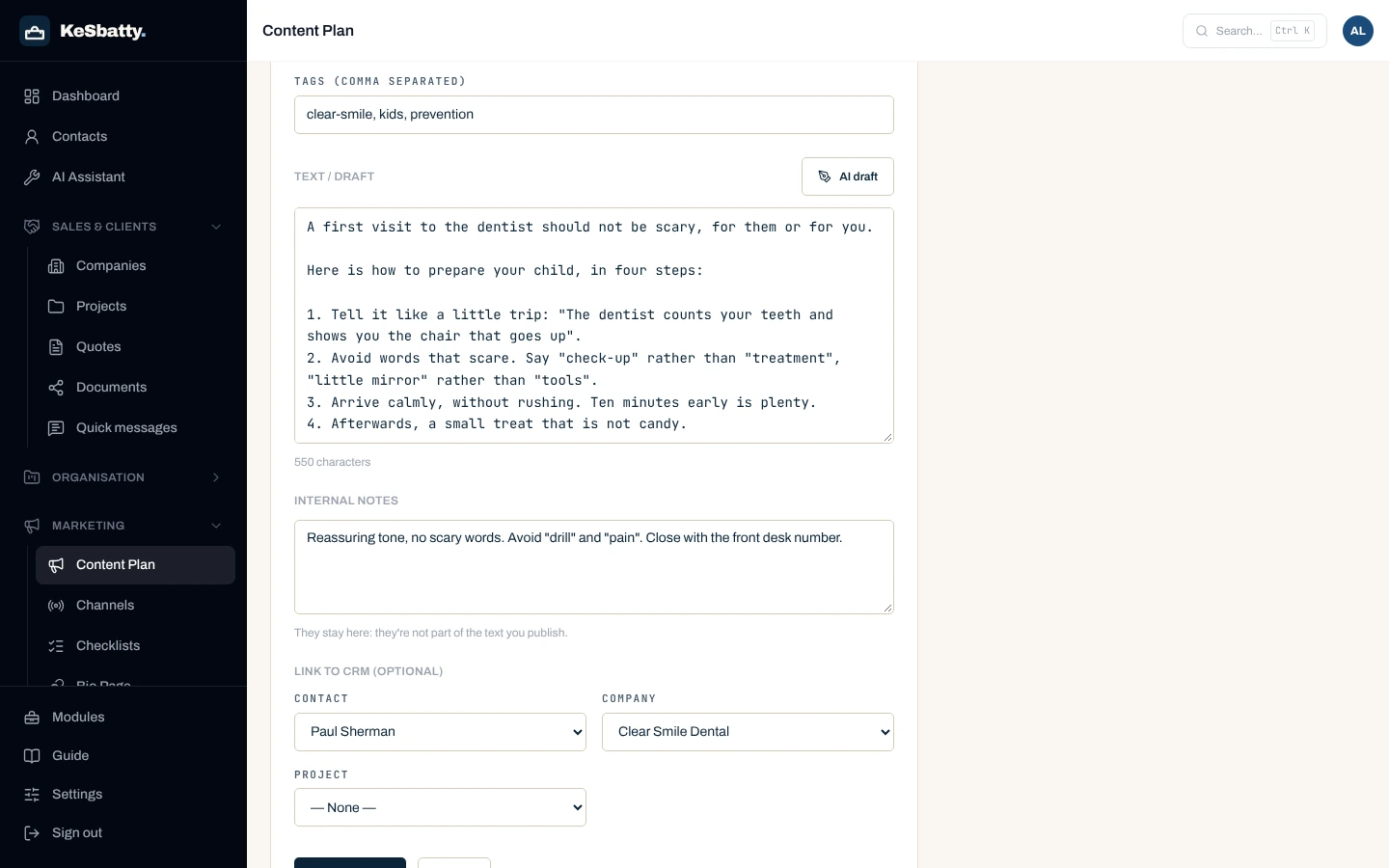
From a post, press "AI draft": from the title, channel and tags it writes a first version, and it uses the notes you have already written as a guide. It writes in the language you work in, English or Italian. It is a draft: you rewrite it, and nothing goes out without you.
Next to the text are the internal notes: what to avoid, why a version was dropped, which scene you still need. They stay there and are never part of what you publish.
These are the tools for your social media work, all included in the Full toolbox. Each one switches on and off whenever you like: the ones you turn off disappear from the menu and the dashboard, and your data stays where it is.
Posts per client and per channel, as a list, kanban or calendar, with a production status and two dates.
Optional items, online signing by the client, a signed copy and automatic reminders.
Files, text and links from your client through one link, with an email code and reminders.
A first draft of a post, from title, channel and tags.
They group contacts and content. Every project has its own work sequence.
A booking link: the client picks a free slot and gets a confirmation and a calendar invite.
Kanban boards with customizable columns and fields, also as a list and a calendar.
A page for your social profile, with your links, a contact form and a resource to download.
A self-assessment questionnaire to share: whoever fills it in becomes an already-qualified contact.
Upload a file and send a public link: the client downloads it without Drive and without logging in.
Text templates with placeholders, filled in with the client's details and downloadable as PDF.
The messages you send most often, already filled in and ready to open on WhatsApp. It prepares, it does not send.
On the first of the month, an email with sales, pipeline, leads, posts, appointments and tasks, compared with the previous month.
The full catalog, including the modules that aren't listed here, is on the home page.
KeSbatty plans, it doesn't publish. The content calendar tells you what goes out, when and on which channel, but posts don't go out on their own: there is no connection with Instagram, Facebook, TikTok or the other channels.
If you want automatic publishing, pair it with a tool built for that. Here you keep the plan, the clients, the quotes and the files. There are no post statistics either, and no bookkeeping.
The lowest price for getting all of these tools. You cancel it yourself whenever you want, and it takes effect at the end of the paid period.
The Full toolbox includes every tool on this page and the other modules in the catalog. Launch price locked in forever for those who activate by December 31, 2026, maximum 100 activations: it may close early. Starting a free trial does not reserve the launch price.
Try it on your next client. At the end you choose whether to subscribe.
Want to start with a subscription right away? Activate the plan now. You pay when you confirm the purchase, then it renews monthly. An Italian VAT number is required only for customers in Italy; elsewhere a VAT or tax ID is optional.
When the trial ends you choose whether to subscribe. If you don't, you continue on the free Base toolbox: the extra modules turn off, your data stays.
Yes. Every client is a contact, with their company if needed, and the content calendar, quotes and material requests all link to them. You can filter the calendar by client, channel, format and project, and every project has its own work sequence.
No, it plans and it doesn't publish. The content calendar tells you what goes out, when and on which channel, but it isn't connected to Instagram, Facebook, TikTok or the other channels, and there is no scheduler that sends posts out. If you want automatic publishing, pair it with a tool built for that.
No. A quote opens from a link and is signed with first name, last name and consent. A material request opens from a link and asks for a one-time code that arrives by email: no account and no password. The content calendar stays yours, though: there is no client area.
Yes, it works in the browser, on your phone too, and there is nothing to install: you can add it to your home screen and it opens full screen. The page where clients hand over their materials is built for phones, because that is where they usually send them from.
For 14 days you have every module, no credit card. If you don't start a subscription, at the end you move to the Base toolbox (contacts, dashboard and reminders, up to 100 contacts). The extra modules turn off and your data stays where it is. To keep the tools on this page, you choose the plan, whenever you want.
Yes. If the Full toolbox costs less than the Social Media Manager plan, we offer that one directly: it also includes project hours and testimonials. The comparison keeps the same billing period and every tool you need. For now, if you already have a subscription, you ask for a plan change by writing to me at phabdev@gmail.com. Your data stays where it is: modules get added, none are taken away.
It writes a first draft from the title, channel and tags, and uses the notes you have already written as a guide. It writes in the language you work in, English or Italian. It is a draft: you review and rewrite it, and nothing goes out on its own. To generate it, that data is sent to an artificial intelligence service.
To a PostgreSQL database hosted in Europe (Frankfurt). Each account sees only its own data, and the separation is enforced by the database itself, not just by the interface. You can export your contacts as CSV whenever you want.
Try everything for 14 days, no card, and decide at the end. If you want the whole catalog, you'll find it on the home page.
Try free for 14 days